
Quick answer: When a phone battery cold snap strikes, your phone does not actually lose its stored charge; it temporarily loses the ability to access it. Freezing temperatures cause the liquid electrolyte inside the battery cell to turn thick and sluggish, drastically increasing internal electrical resistance. Your phone’s battery management system senses the resulting voltage drop as an empty tank and shuts the device down instantly to protect delicate internal electronics.
Your missing battery life has not vanished into thin air. It is locked behind a barrier of slowed chemistry until the hardware warms back up.
If you are waiting on a sub-zero commuter train platform watching your battery percentage tumble from 45 percent to a black screen in thirty seconds, your hardware is playing an aggressive defensive game.
For a runner tracking pace with GPS while streaming audio through freezing winds, high processing demand pulls sharp bursts of current that trip that low-voltage cutoff even faster.
If you are driving with your phone mounted directly in front of a drafty windshield vent, icy air chills the battery casing while turn-by-turn navigation works the processor into a panic.
What actually happens inside a lithium-ion battery in freezing temperatures?
Inside your handset sits a lithium-ion cell, which generates electricity through pure chemistry.
The cell contains a graphite anode, a metal-oxide cathode, and a liquid electrolyte solution filling the physical space between them.
When the phone is active, lithium ions migrate from the anode through that liquid electrolyte to dock inside the cathode, releasing electrons that power your display and processor.
At room temperature, the electrolyte is fluid and thin, letting ions glide across with almost no resistance.
Sub-freezing air changes that liquid state. The electrolyte turns thick and sluggish, behaving more like cold molasses than water.
According to published Battery University discharge testing data, a lithium-ion cell delivers 100% of its rated capacity at 80°F (27°C). Drop the ambient air down to 32°F (0°C), and usable capacity falls to roughly 80%. Take it down to 0°F (-18°C), and the battery delivers only about 50% of its normal capacity.
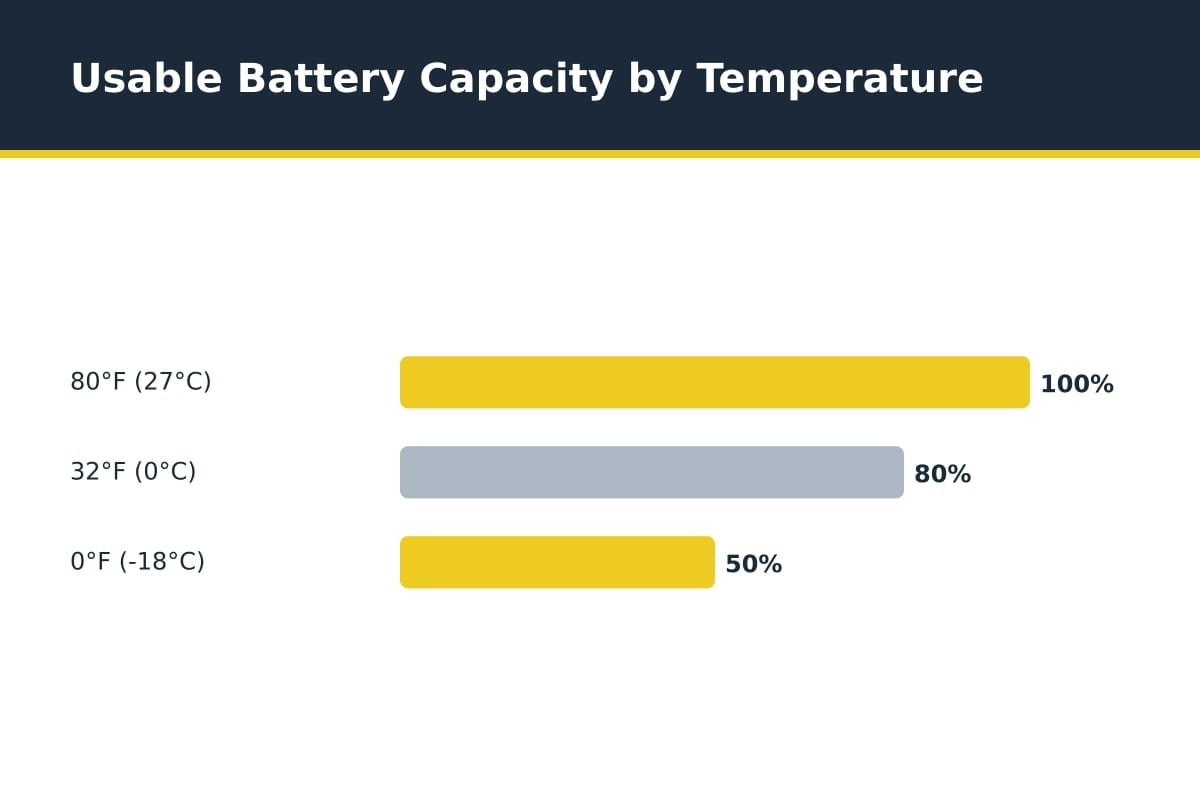
That missing 50 percent has not escaped. It is simply trapped behind an electrochemical traffic jam until the cell warms up.
Why does your phone battery cold drop cause an instant shutdown?
If half the power is still technically in the battery, you might wonder why the phone shuts off completely instead of gradually slowing down.
The culprit is the battery management system, or BMS.
The BMS is a dedicated microchip that guards the battery against fire, deep discharge, and catastrophic circuit failure.
Smartphones do not have a tiny dipstick to check fuel levels. Instead, the BMS estimates your remaining percentage by combining coulomb counting with real-time cell voltage measurements.
A healthy, fully charged single-cell lithium battery operates at about 4.2 volts. As the phone runs down, that voltage steadily declines toward roughly 3.4 volts, which software translates to zero percent.
Basic physics dictates that voltage equals current multiplied by resistance. When cold temperatures drive internal resistance through the roof, drawing power produces an immediate drop in operating voltage, an effect known as voltage sag.
If your phone sits idle in a pocket, it draws very little power, so voltage stays stable. Pull the phone out into the biting wind to open a camera or check transit directions, and your processor suddenly pulls a heavy surge of current.
That burst of current hitting high internal resistance causes the cell’s voltage to plunge instantly below the safe minimum threshold of roughly 3.2 volts.
The BMS panics. It interprets that artificial voltage collapse as an entirely dead battery and executes an emergency shutdown to prevent the operating system from crashing or corrupting onboard storage.
Many people assume this means their battery has worn out permanently. As we explained when breaking down why users should Stop Obsessing Over Your Phone’s Battery Health, chemical aging and ambient temperature are distinct factors. An older battery with elevated baseline resistance will trip that low-voltage cutoff even sooner in winter conditions.
If you’d rather watch than read, this video covers it well: Why Does Your Phone Battery Die Faster in the Cold?.
Does freezing weather permanently damage your smartphone battery?
Discharging a phone in freezing weather will not permanently degrade its battery capacity.
The sluggish ion flow and sudden voltage drop are temporary physical states.
Once the battery cell warms back up to room temperature, the liquid electrolyte thins out, internal resistance drops back to normal, and the cell’s voltage rebounds. That dead phone will suddenly display its original charge level.
Extreme heat is the true villain for lithium batteries. Leaving a phone on a sweltering car dashboard in July degrades the electrolyte, breaks down cathode materials, and causes permanent, irreversible capacity loss. Cold merely puts the chemistry into temporary suspension.
Major device manufacturers design their hardware around these thermal realities. According to official Apple device operating temperature guidelines, phones are meant to operate between 32°F and 95°F (0°C and 35°C), while safe storage ranges from -4°F to 113°F (-20°C to 45°C).
Your screen may also act strange in the cold. Older LCD displays use physical liquid crystals that stiffen in freezing air, producing noticeable ghosting and sluggish refresh rates. Modern OLED screens eliminate liquid crystals, but the display driver circuitry can still stutter under extreme winter chill.
Why is charging a frozen phone the worst mistake you can make?
Using a cold phone is entirely harmless to the hardware; attempting to charge a frozen phone is catastrophic.
Plugging a lithium-ion cell into power while its internal core sits below freezing (32°F or 0°C) causes permanent, irreversible structural damage.
During normal charging, an external power supply forces lithium ions to travel backward through the electrolyte and slot between layers of graphite on the anode, a process called intercalation.
In freezing air, the graphite lattice contracts while the thickened electrolyte slows ion movement to a crawl. The incoming ions arrive at the anode far faster than they can squeeze inside.
Instead of absorbing cleanly, the lithium ions accumulate on the surface of the anode and convert into solid metallic lithium, an effect known as lithium plating.

Over repeated cold charges, this plated metal sprouts microscopic, jagged needles called dendrites.
These dendrites can puncture the delicate separator membrane between the anode and cathode, causing internal electrical short circuits and severe capacity loss.
Research highlighted by the University of Michigan engineering team studying low-temperature charging shows that preventing lithium plating is the primary hurdle in cold-weather battery engineering because plated lithium can never be converted back into usable stored energy.
Modern smartphones feature firmware that refuses to charge when internal thermistors detect freezing conditions. But basic power banks or car adapters can sometimes force raw current into a cold phone before safety chips intervene.
How should you safely revive a phone that died in the cold?
If your screen goes dark on a snowy walk, resist the temptation to panic.
The most dangerous response is attempting to force-heat the device with aggressive warmth.
Never aim a hair dryer at an icy phone, hold it directly over a car heater vent running on high, or rest it on a cast-iron radiator.
Extreme heat creates sharp temperature gradients across the device. Glass panels expand faster than aluminum frames, risking fractured screens and warped waterproof seals.
The most effective heat source is resting against your ribs right now.
Slip the cold handset into an interior jacket pocket, close to your torso. Your natural body heat, hovering around 98.6°F (37°C), acts as a gentle incubator that warms the phone evenly without thermal shock.
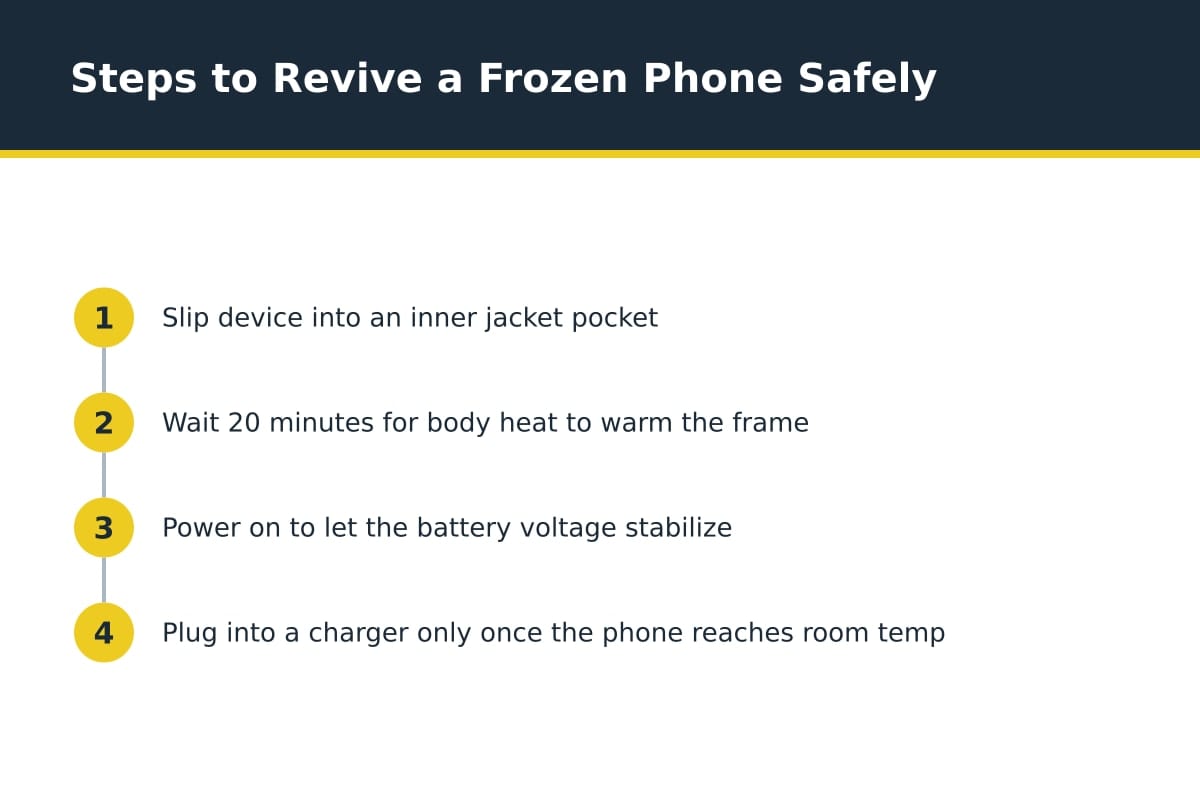
Leave the phone alone for twenty minutes so the dense internal battery pack can warm completely to its core.
Once the phone feels neutral in your palm rather than biting cold, hold the power button. In almost every case, it will boot up and display nearly the exact battery percentage you had before it cut out.
Hold off on connecting a charger until the device has spent twenty minutes resting at normal indoor room temperature.
How do you keep your phone alive during winter outdoor activities?
Keeping a phone alive in winter requires simple thermal awareness.
Pocket placement is everything. Never store your device in an exterior coat pocket, the outer sleeve of a ski parka, or an outside backpack pouch.
Use an inside chest pocket instead. The warmth escaping from your torso acts as a continuous battery warmer throughout your hike, run, or ski run.
For extended days in deep backcountry snow, slip your phone into an insulated thermal pouch made from closed-cell foam or neoprene. These small pouches trap the device’s own waste heat, preventing sub-zero wind chill from stripping warmth from the aluminum frame.
Enable Low Power Mode before you step out into the freezing air.
Low Power Mode dims display brightness, throttles processor clock speeds, and suspends background app synchronization. By flattening sudden current spikes, it prevents the voltage dips that trick the BMS into an emergency shutdown.
Treat the camera app with caution. Launching the camera fires up the image sensor, drives the screen to full brightness, and runs compute-heavy machine learning models simultaneously.
That combination creates the single highest power spike your phone can demand. If your battery is already cold, opening the camera is almost guaranteed to trigger an immediate shutdown.
If you want a photo, compose your shot in your head first, pull the phone out, snap the picture quickly, and return the handset to your inner pocket immediately.
Turn on Airplane Mode if you are traveling through areas with poor cellular reception. Searching for weak signals forces the radio modem to broadcast at maximum wattage, burning through power and cooling the cell faster.
Cold weather reveals just how dependent daily life has become on fragile glass touchscreens. Try standing on a freezing outdoor ski patio trying to place a lunch order; as we argued when explaining why It’s Time to Admit QR Code Menus Were a Mistake, forcing people to use freezing smartphones for basic transactions is terrible design.
If you need music or call controls while outdoors, keep your phone buried warm in your coat and rely on wireless earbuds or a smartwatch to handle playback.
When winter weather strikes, remember that chilled cells are not broken cells. The next time you face a sudden phone battery cold shutdown, keep the charging cable in your bag, tuck the handset close to your chest, and let body heat do the chemistry work for you.